
Logic Pro vs Studio One 7: a producer comparison
Logic Pro is a Mac-only powerhouse with a huge stock library. Studio One 7 is cross-platform with a fast single-window workflow. Here is how they compare.
Logic Pro and PreSonus Studio One are two of the most respected full-featured DAWs for serious producers. Both handle recording, MIDI, mixing, and mastering at a professional level.
This comparison covers platform and price, workflow, stock content, mixing and mastering, and who each DAW suits.
Platform and price
Logic Pro is exclusive to macOS, with an iPad version too. It is a one-time $199 purchase with free major updates — extraordinary value given the enormous bundled library. There is no Windows version.
Studio One runs on both macOS and Windows. You can buy a perpetual Professional license or take the Studio One+ subscription. If you work on a PC, or split between operating systems, Studio One is the obvious choice.
- Logic Pro: macOS and iPad only, one-time $199, free major updates
- Studio One 7: macOS and Windows, perpetual or subscription
- Cross-platform projects favor Studio One
Workflow and interface
Studio One is built around a clean single-window layout with strong drag-and-drop. The dedicated Project page gives you an integrated mastering environment inside the same app, so you go from arrangement to a finished, sequenced album without exporting to a separate tool.
Logic Pro has a friendly, familiar interface that beginners and pros both navigate quickly. Its Live Loops grid borrows the loop-triggering idea from Ableton, while the traditional timeline handles linear arrangement. Detailed multi-track audio editing can feel a touch slower than in Studio One.
Stock instruments and content
Logic Pro's bundled library is its trump card: tens of gigabytes of instruments, loops, Drum Machine Designer kits, and the AI-driven Session Players (Drummer, plus bass and keyboard players) that generate convincing backing parts. Flex Time and Flex Pitch handle timing and tuning natively.
Studio One ships with Presence XT, Mai Tai, Impact XT, and a solid effects set, plus integrated Melodyne via ARA for note-level pitch editing. It is generous, though Logic's raw quantity of stock sounds is larger.
Mixing and mastering
Both have capable, modern mixers. Studio One's standout is the Song-to-Project mastering workflow, purpose-built for assembling and mastering a release inside the DAW.
Logic's mixer is deep and integrates beautifully with its stock plugins and Apple Silicon performance. For pure in-the-box mixing both are excellent. Studio One has the edge if integrated mastering matters to you.
Which one should you pick?
Pick Logic Pro if you are on a Mac and want maximum value: a massive stock library, Session Players, and tight Apple Silicon optimization for a single $199 payment.
Pick Studio One 7 if you need Windows support, prefer an integrated mastering page, or want Melodyne built into a fast single-window workflow. It is the more flexible choice across operating systems.
Frequently asked questions
Can I run Logic Pro on Windows?
No. Logic Pro is exclusive to macOS and iPadOS. If you are on Windows and want a comparable full-featured DAW, Studio One is the natural alternative, since it runs on both Windows and Mac.
Which DAW has more stock instruments?
Logic Pro ships with the larger bundled library, including Session Players and tens of gigabytes of loops and instruments. Studio One is generous too, with Presence XT, Mai Tai, Impact XT, and integrated Melodyne, but Logic has more raw content.
Is Studio One better for mastering?
Yes. Studio One has a dedicated Project page that gives you an integrated mastering environment for sequencing and finalizing a release. Logic can master in-the-box but has no separate dedicated mastering page.
Which is easier to learn?
Both are beginner-friendly. Logic Pro has a familiar, approachable layout and runs smoothly on Apple hardware. Studio One's single-window, drag-and-drop design is also fast to pick up. The better choice depends mostly on your platform.
Recommended Related Products
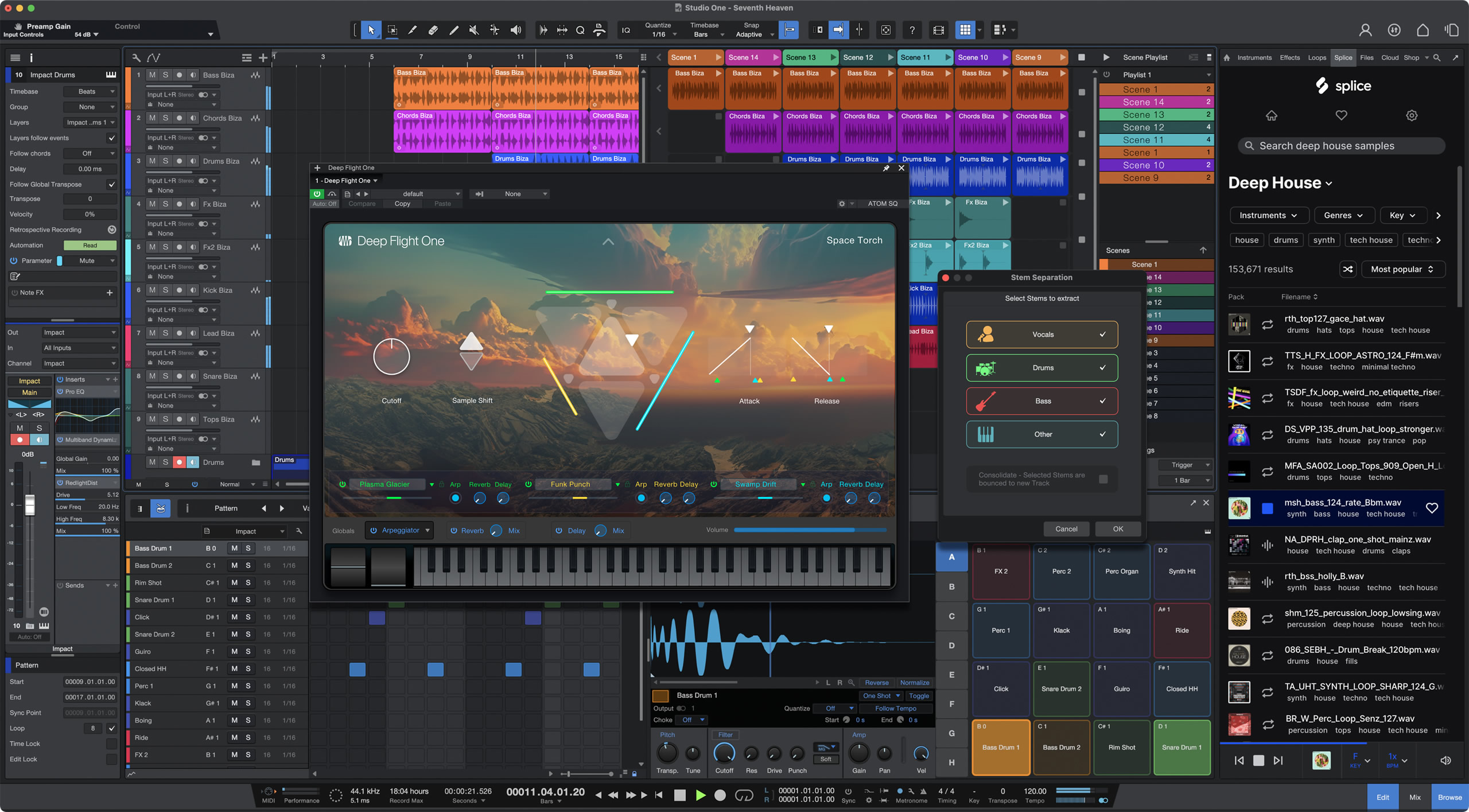
PreSonus Studio One 7 Pro
A complete DAW for tracking, editing, mixing, mastering, and live performance.