
Studio One 7: The DAW That Replaced Pro Tools and Logic for Thousands of Producers
PreSonus Studio One 7 delivers a drag-and-drop workflow, a built-in mastering suite, integrated Melodyne pitch editing, and the Show Page for live performance, all in a single-window interface that removes the menu diving most DAWs require.
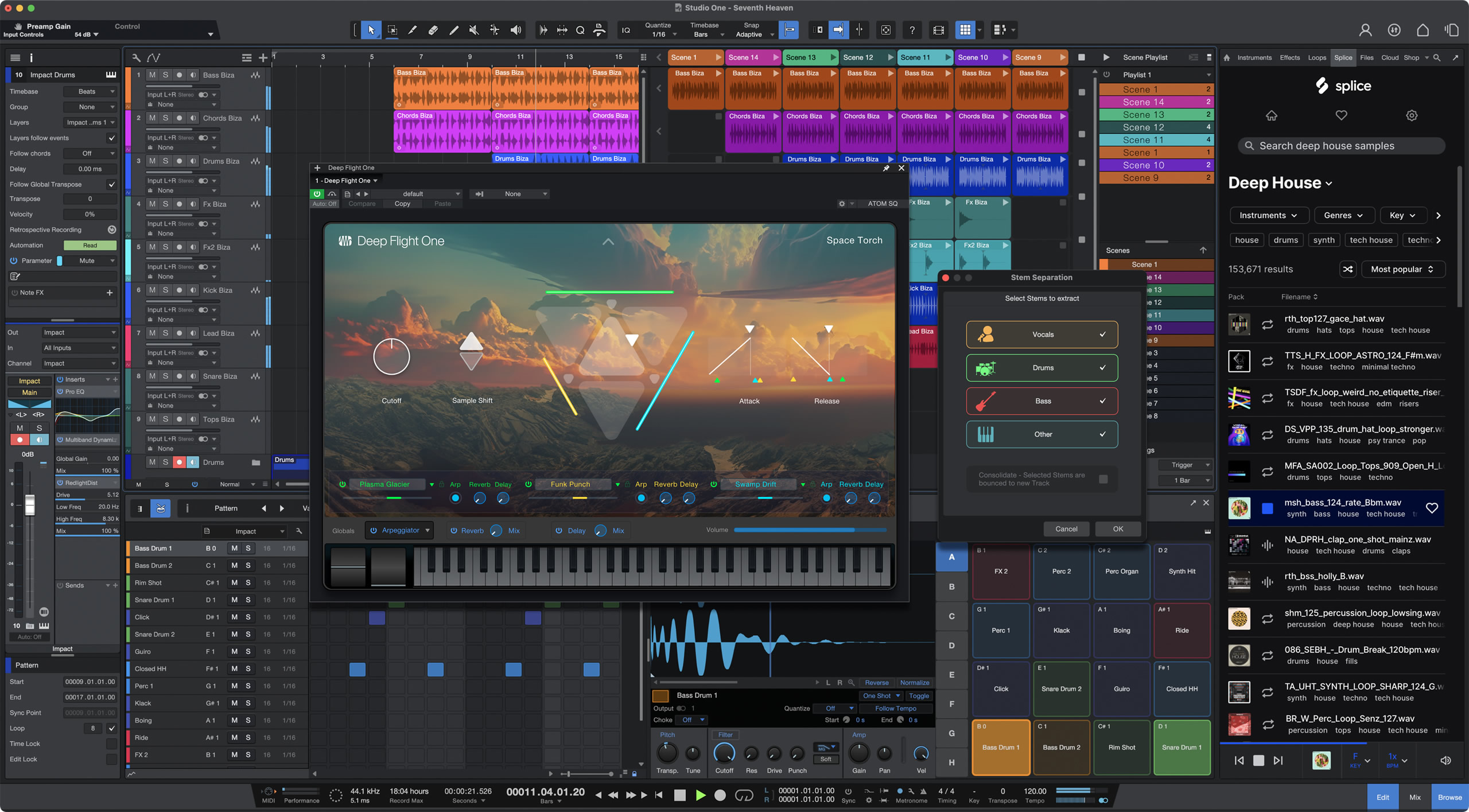
Studio One 7 from PreSonus has earned a serious following among producers who want a modern DAW without the legacy complexity of Pro Tools or the platform lock-in of Logic Pro. Its entire architecture is built around a single-window interface where the arrange view, mixer, editors, and browser coexist without modal dialogs or constant menu navigation. Nearly every operation works by drag-and-drop: dropping a loop onto the timeline creates a track, dropping an effect onto a channel inserts it into the chain, and dropping a MIDI clip onto an instrument loads it immediately. This approach removes friction from the session in a way that changes how production actually feels on a daily basis.
Version 7 extends this philosophy with Clip Gain Envelope refinements for precise per-clip automation, Notion integration for producers who also write notation, and Smart Templates that configure new sessions automatically based on project type. The DAW also stands apart through its Project page mastering suite that connects directly to the mix session, the Show Page for live performance, a Chord Track that applies harmonic edits across the full arrangement, and a licensed copy of Melodyne Essential for inline pitch editing. These features arrive in the same window without switching modes or opening separate applications.
Drag-and-Drop Workflow and the Single-Window Interface
Most DAWs require producers to navigate multiple floating windows and buried menu paths to complete common tasks. In Studio One, the workflow is built around drag-and-drop operations that keep focus on the material rather than on dialogs. Instruments and effects load by dragging from the browser onto a track. Audio files preview with a single click in the browser and drop directly to the timeline at the playhead position. Automation lanes appear by clicking a disclosure arrow on the track itself, not through a separate menu. The result is a session that moves at the pace of creative decisions rather than at the pace of the software.
The browser panel covers instruments, effects, loops, files, and the pool, each accessible through tabs on the right side of the window. A single search field spans all content simultaneously, so locating a specific reverb or a drum loop takes one typed query rather than navigating category trees. Experienced Studio One users rarely need the menu bar during an active session, which is a workflow advantage that compounds over long projects.
The single-window layout benefits laptop producers working on one monitor. The mixer lives in the lower section of the same window and expands on demand, so toggling between arrange and mix view takes one keystroke. The MIDI, audio, and automation editor opens in that same lower panel without covering the arrange area, keeping timeline context visible while editing fine detail.
The Project Page: Mastering Inside the Session
The Project page is one of Studio One's most distinctive features: a dedicated mastering environment linked directly to your mix sessions. When a Song page mix is finished, the exported file appears in the Project page as a mastering track. If you later revise the mix and re-export, the Project page detects the update and reflects it automatically. This two-stage connection means mix revisions flow into the master without manually replacing files or losing master chain settings.
The Project page includes a professional mastering signal chain with a multiband limiter, EQ, and full metering. Multiple songs sit side by side, allowing level matching to a consistent integrated LUFS target for streaming platform delivery. Export includes proper track gaps, CD-standard markers, and DDP output for replication, all from the same session that produced the mix. For independent producers and engineers who handle both mixing and mastering for the same project, this eliminates the need for a separate mastering application.
True inter-sample peak detection, LUFS metering calibrated to current streaming platform targets, and the direct link between mix revisions and master renders make the Project page a genuine professional tool. It is one of the clearest differentiators that separates Studio One from Ableton Live and FL Studio at the same price tier.
Chord Track, Integrated Melodyne, and the Show Page
The Chord Track is a lane in the arrange view that defines the harmonic content of the song at each position. MIDI parts set to follow the Chord Track transpose automatically when a chord symbol changes, without altering the underlying MIDI data. Large harmonic edits — such as changing a chorus from major to minor or transposing the whole arrangement for a vocalist — become a matter of editing one lane rather than every individual part. This is one of the most practical harmonic editing tools in any DAW and a feature that Logic and Ableton do not offer at the same level of arrangement integration.
Studio One bundles Melodyne Essential from Celemony as a native pitch editor. Rather than opening a separate plugin window, Melodyne launches inline on the audio track, displaying pitch blobs directly on the clip in the arrange view. Corrections are stored as part of the session and render automatically with the mix. Producers who need polyphonic pitch editing or advanced tempo detection can upgrade to Melodyne Assistant or Melodyne Editor within the same interface, with no change to the workflow or session format.
The Show Page converts Studio One into a live performance environment. Tracks, virtual soundcheck tools, a setlist view, cue-based playback, and hardware integration for click and monitor routing all sit in a dedicated performance layout. Bands and solo performers who produce with Studio One and then perform with backing tracks find the Show Page eliminates the need for a separate live application such as Ableton Live in session view or MainStage, keeping the entire production and performance workflow inside one product.
Who Switches to Studio One and Why
The most common migration path to Studio One is from Pro Tools. Pro Tools carries decades of professional credibility and remains the standard in commercial recording studios, but its session management, proprietary hardware requirements in some configurations, and subscription pricing create friction for producers who work primarily at home or in private studios. Studio One offers a comparable feature set for recording and mixing with a perpetual license option that appeals to producers who want to own their tools outright rather than pay ongoing fees for access.
Logic Pro users who move to a Windows machine or who collaborate with Windows-based engineers switch to Studio One for cross-platform compatibility. Logic is macOS exclusive with no Windows equivalent, while Studio One runs identically on both platforms with shared session formats. Ableton Live users sometimes switch when their work shifts from performance-oriented electronic production toward more traditional recording, since Studio One handles audio comping, detailed editing, and console-style mixing with more conventional tools designed for that workflow.
Version 7's Smart Templates accelerate project setup by configuring routing, track counts, and plugin chains based on templates you define for common session types. Notion integration links the DAW to PreSonus's notation software, allowing producers who also write scores to move between environments without file conversion. Clip Gain Envelope improvements provide finer control over per-clip gain automation directly on the audio clip, which benefits engineers doing dialogue editing, detailed vocal rides, or precision level work before the channel fader.
Frequently asked questions
Is Studio One 7 suitable for both recording and electronic music production?
Studio One handles both workflows in the same session without mode changes or restructuring. The arrange view manages linear recording, comping, and audio editing alongside MIDI programming, virtual instruments, and loop-based production. Producers who combine live recorded instruments with electronic elements find the single-window layout keeps both contexts accessible at the same time, and the drag-and-drop browser works identically for audio files, loops, and MIDI clips regardless of the production style.
Does Studio One 7 include Melodyne for pitch correction?
Studio One 7 bundles Melodyne Essential from Celemony at no extra cost. It opens inline on audio tracks directly in the arrange window, so pitch corrections appear on the clip itself and render automatically with the mix. Producers who need polyphonic pitch editing, advanced tempo detection from audio, or deeper note manipulation can upgrade to Melodyne Assistant or Editor within the same interface, with the inline workflow unchanged.
What are the main new features in Studio One 7?
Version 7 delivers three significant additions: Clip Gain Envelope refinements for more precise per-clip automation on tasks such as dialogue editing and vocal rides; Notion integration that links Studio One directly to PreSonus's notation software so producers who write scores can move between DAW and score editor without file conversion; and Smart Templates that configure new sessions automatically based on the project type you select. These build on Studio One's existing workflow advantages without changing the core interface that existing users already know.
Recommended Related Products
PreSonus Studio One 7 Pro
A complete DAW for tracking, editing, mixing, mastering, and live performance.