
Getting Pro Drum Tones Fast With Addictive Drums 2
Learn how to dial in polished, mix-ready drum tones quickly in XLN Audio Addictive Drums 2 using kit presets, the Transform feature, per-channel FX and send effects.
Where some drum plugins chase deep acoustic realism, XLN Audio Addictive Drums 2 is built around speed. The whole idea is to get a polished, mix-ready drum sound in seconds instead of spending an hour at a virtual console. The kits are recorded by outstanding session drummers in legendary studios, but the real advantage is the built-in, studio-grade mixing tools that let you shape every detail without ever leaving the plugin.
The workflow starts from production-ready presets, uses the Transform feature to reshape grooves on the fly, sculpts each kit piece with its own FX chain, and glues the kit together with send effects. The result is drums that drop into a mix and sit right with minimal outside processing.
Start From Production-Ready Presets
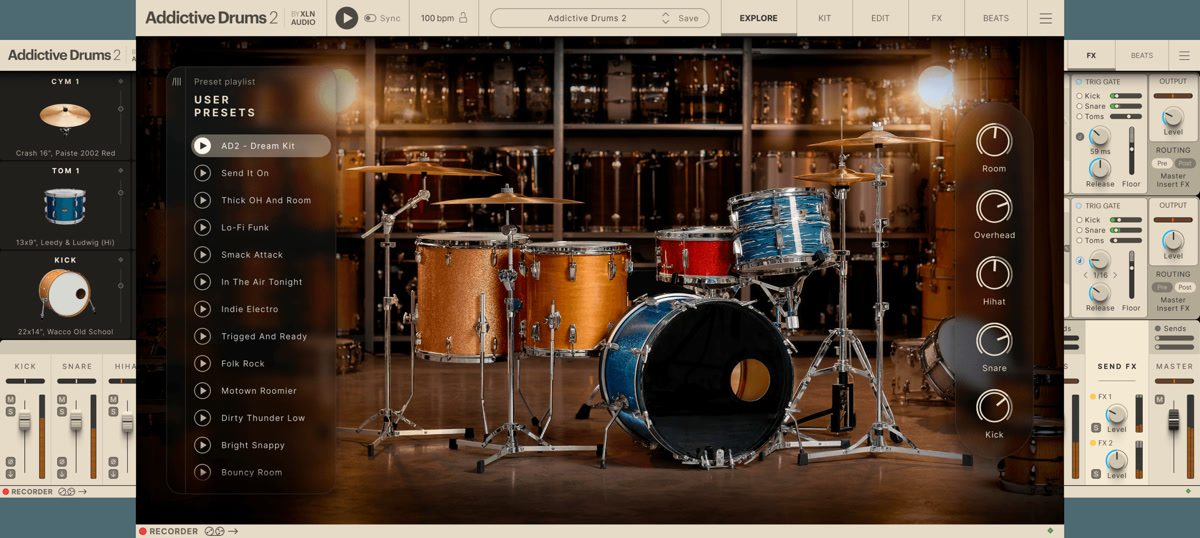
The fastest path to a great tone is to start with a preset and adjust, rather than building from scratch. Addictive Drums 2 and its ADpak expansions ship with complete kits and a large number of production-ready presets, each one a full kit plus a tuned mix designed for a specific genre and style. Browse by sound or genre, audition presets against your track, and pick the one that already sits closest to what you hear in your head.
Because each preset includes a finished mix, the EQ, compression and effects are already dialed in to a professional standard. From there you only need small adjustments to fit your specific song. You begin eighty percent of the way to a finished sound, not at zero.
- Browse presets by genre or sonic character to find a close starting point.
- Each preset is a full kit plus a professionally mixed tone.
- Adjust from a finished sound rather than building a mix from scratch.
- ADpak expansions add genre-specific kits and presets for more variety.
Reshape Grooves With Transform
Addictive Drums 2 includes a large library of MIDI grooves performed by session drummers, and the Transform section lets you creatively tweak these grooves on the fly. It is especially useful for modifying MIDI patterns in real time, changing the feel, complexity or intensity of a beat without manually editing every note. You can audition variations quickly and find the groove that fits your arrangement.
Choose a base groove that matches your song's feel, then use Transform to adapt it to the energy of each section: simpler and sparser for verses, busier and more intense for choruses. Drag the finished MIDI into your DAW and you have a performed, human-feeling drum part in minutes.
Sculpt Each Kit Piece With FX Chains
Every kit piece in Addictive Drums 2 has its own dedicated FX chain, so you can fine-tune each drum on its own. The per-channel processing includes compression, distortion, EQ, tape saturation, transient shaping and noise, among others. That means you can add punch to the snare with transient shaping, warm up the kick with saturation, carve space with EQ and tighten the whole kit without ever opening a third-party plugin.
The transient and saturation controls are especially powerful for getting modern, aggressive tones quickly. Pull up the attack on a kick or snare to make it cut through a dense mix, add tape saturation for warmth and glue, and use the noise layer to add character or reinforce a weak snare.
- Compression and transient shaping for punch and attack.
- EQ to carve space and balance the kit.
- Tape saturation and distortion for warmth and aggression.
- A noise layer to add character or reinforce individual pieces.
Glue the Kit With Send Effects
Beyond the per-channel processing, Addictive Drums 2 provides two send effects that help glue the whole kit together. Routing the kit pieces to shared sends — usually a reverb and a delay or a second ambience — creates a cohesive sense of space, so the drums sound like they were recorded in one room rather than assembled from separate channels.
Use the sends sparingly for tightness, or push them for a bigger, more ambient sound. Combined with the per-channel FX, the send effects let you finish the entire drum mix inside the plugin with very little corrective work remaining in the DAW.
A Fast, Complete Drum Workflow
The strength of Addictive Drums 2 is that the whole chain — from sound selection to finished mix — lives in one place. For producers in pop, rock, electronic and hip-hop who value a polished, ready-to-use drum sound and a fast workflow over deep acoustic micro-control, Addictive Drums 2 consistently delivers professional results in a fraction of the time. The built-in tutorials, reachable from the menu inside the plugin, are a quick way to learn the interface if you are new to it.
- Choose a production-ready preset that fits your genre and audition it against your track.
- Use Transform to adapt the groove to each section — simpler for verses, more intense for choruses.
- Refine each kit piece with its dedicated FX chain: compression, EQ, saturation and transient shaping.
- Route kit pieces to the send effects to add shared space and glue the kit together.
- Print or bounce the drums — they are already mix-ready with tone, dynamics and ambience set.
Frequently asked questions
What is the fastest way to get a good drum tone in Addictive Drums 2?
Start from a production-ready preset rather than building from scratch. Each preset is a complete kit with a professionally tuned mix, so you begin most of the way to a finished sound and only make small adjustments to fit your song. Browse presets by genre, audition them against your track, pick the closest match, then refine with the per-channel FX.
What does the Transform feature do in Addictive Drums 2?
<strong>Transform</strong> lets you creatively reshape MIDI grooves on the fly, changing the feel, complexity and intensity of a beat in real time without editing individual notes. It is ideal for adapting a base groove to different sections of a song, keeping verses sparse and making choruses busier, then dragging the result into your DAW as a performed drum part.
Can I mix drums entirely inside Addictive Drums 2 without external plugins?
Yes. Each kit piece has its own FX chain with compression, EQ, saturation, transient shaping, distortion and noise, and there are two send effects to glue the kit together with shared space. This lets you finish the drum mix inside the plugin, so by the time you print the drums they already have the tone, dynamics and ambience you want.
How is Addictive Drums 2 different from a deep library like Superior Drummer 3?
Addictive Drums 2 prioritizes speed and a polished, pre-mixed sound, which makes it ideal when you want a ready-to-use drum tone quickly with a light system footprint. <strong>Superior Drummer 3</strong> offers far deeper acoustic realism and console-style mic control, at the cost of more setup time and disk space. Choose Addictive Drums 2 for fast, modern, mix-ready tones, and SD3 when the drum recording itself has to carry the production.
Recommended Related Products
XLN Audio Addictive Drums 2
Fast, flexible acoustic drum sampler with legendary preset kits.