
AutoTune vs Melodyne: Which Pitch Correction Plugin Should You Use?
AutoTune and Melodyne are both industry-standard pitch correction tools, but they work in completely different ways. Knowing when to reach for each one makes all the difference.
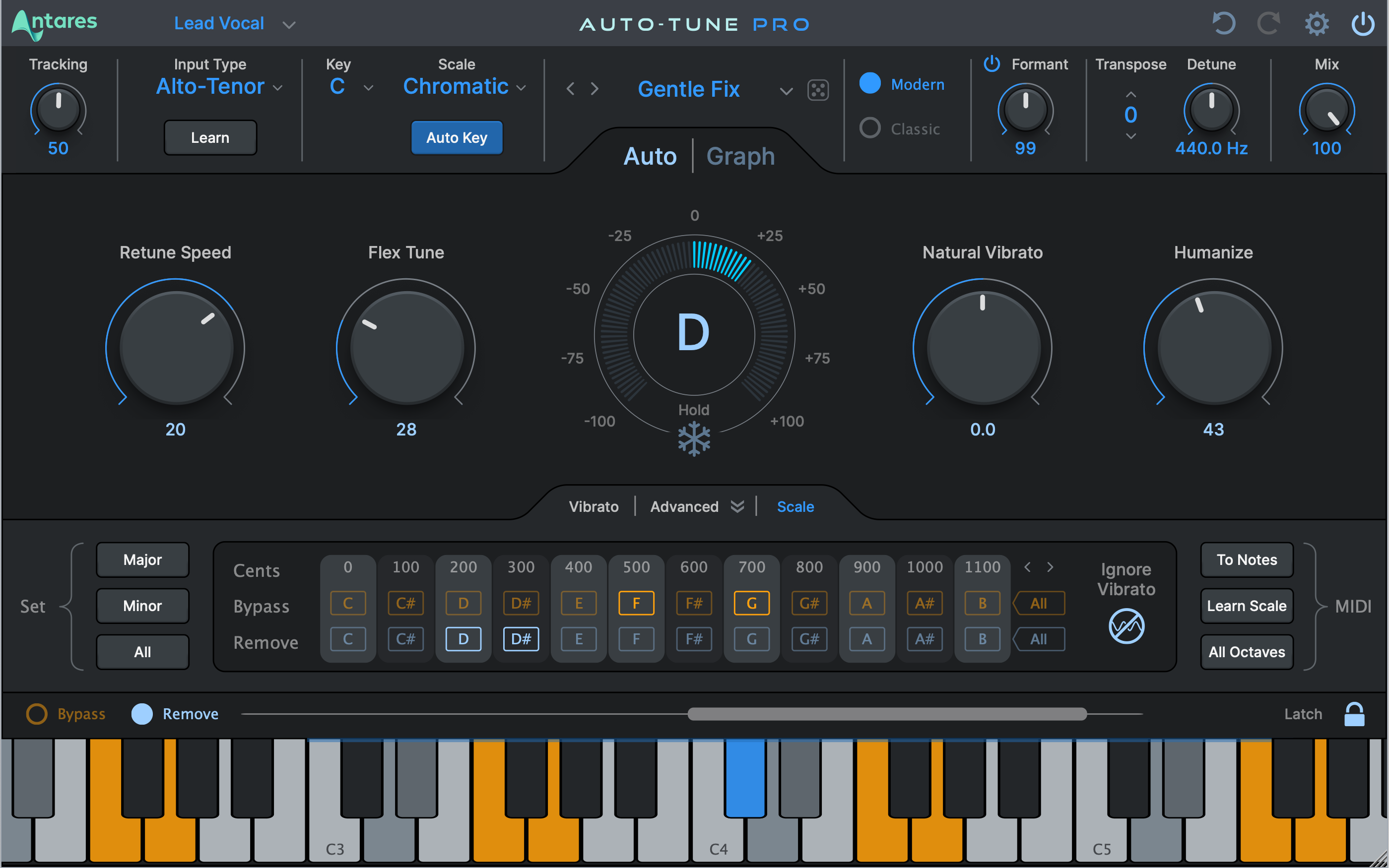
Pitch correction is now a standard part of almost every vocal production workflow. AutoTune and Melodyne are the two plugins that dominate professional studios, but they are built on different technologies and solve different problems.
AutoTune processes pitch in real time and is best known for the quantized, robotic vocal sound popularized in hip-hop and pop. Melodyne takes a completely different approach: it analyzes a recording into individual note blobs and lets you reshape them manually with precision that no real-time tool can match.
Understanding how each plugin works helps you pick the right one for the task at hand, and explains why many professional studios keep both installed at all times.
How AutoTune works
AutoTune by Antares Audio Technologies monitors incoming audio in real time and moves the pitch toward the nearest note in the selected scale. The Retune Speed control determines how aggressively the correction is applied. Fast settings produce the iconic robotic effect; slower settings allow natural pitch movement and vibrato to pass through, making the correction nearly imperceptible.
ARA2 integration in Logic Pro, Studio One, and Pro Tools lets AutoTune operate directly on rendered audio in the timeline without real-time latency or a separate bounce step. This is the standard workflow for mix engineers who want AutoTune on a comped vocal without sacrificing responsiveness.
AutoTune also accepts MIDI input through its Auto-Key and Auto-Mode features, which allow you to lock a vocal to a specific melody note by note. This is the foundation for creative pitch effects, harmonizers, and the hard-tune aesthetic used across modern pop and hip-hop production.
How Melodyne works
Melodyne by Celemony uses a proprietary technology called Direct Note Access (DNA). Instead of processing audio in real time, Melodyne analyzes a recording after the fact and separates it into individual note objects displayed in a piano-roll-style editor. You drag, quantize, stretch, and retune each note individually with full visual control over pitch center, vibrato, pitch drift, and formants.
The most powerful capability in Melodyne is polyphonic editing. With DNA, you can open a chord recorded on an acoustic guitar or a piano track and move individual notes within that chord independently. No other pitch correction tool on the market offers this, and it makes Melodyne essential for any project that involves reharmonizing recorded instruments.
Melodyne is also the right choice for detailed repair work: fixing a single out-of-tune syllable in an otherwise perfect take, correcting inconsistent vibrato, smoothing pitch drift on long sustained notes, or reworking the entire melodic contour of a vocal line. All edits are non-destructive and visually clear on screen.
Common workflows for each plugin
AutoTune fits naturally into the tracking stage. Running it as a real-time insert gives the vocalist pitch feedback in their headphone mix and helps the session move faster. During mixing, ARA2 integration keeps it inside the DAW timeline for quick adjustments without bouncing.
Melodyne fits best into the editing phase, after comping the best take.
- Transfer the comped vocal into Melodyne via ARA or by bouncing to a new track.
- Work through the performance note by note to correct intonation and tighten timing.
- Finalize edits before the track reaches the mixing stage.
Why many studios keep both
AutoTune and Melodyne are not competing tools in practice. They cover different stages of production and have capabilities the other cannot replicate. AutoTune handles real-time correction and MIDI-driven pitch effects. Melodyne handles note-level editing and polyphonic audio repair.
If you produce or mix vocals professionally, having both available removes the need to compromise. You can use the right tool at each stage rather than forcing one plugin to do a job it was not designed for.
If budget is a constraint, start with whichever matches your most common need: AutoTune for live tracking environments and the hard-tune effect, Melodyne for detailed post-recording editing and polyphonic work.
Frequently asked questions
Can I use AutoTune transparently without the robotic effect?
Yes — set <code>Retune Speed</code> above 20–50 milliseconds to allow natural pitch movement and vibrato to pass through. At those settings most listeners cannot detect correction is applied. The robotic effect only appears when Retune Speed is set very fast.
Does Melodyne work as a real-time plugin during tracking?
No — Melodyne requires audio to be recorded first, then analyzes it into editable note objects. For live tracking where the vocalist needs pitch correction in their headphone mix, AutoTune or a similar real-time plugin is the correct choice.
Can Melodyne edit individual notes inside a guitar chord?
Yes — the polyphonic DNA feature in Melodyne Editor and Studio editions separates chord audio into individual note objects that you can move independently. This works on guitar chords, piano recordings, and layered vocals. The Essential edition does not include DNA and is limited to monophonic audio.