
Battery 4: The Drum Sampler Built for Electronic Music and Hip-Hop
Battery 4 by Native Instruments is a grid-based drum sampler that gives you full control over every hit in your kit. Learn how its cell layout, per-cell processing, and bus system make it the go-to tool for electronic and hip-hop production.
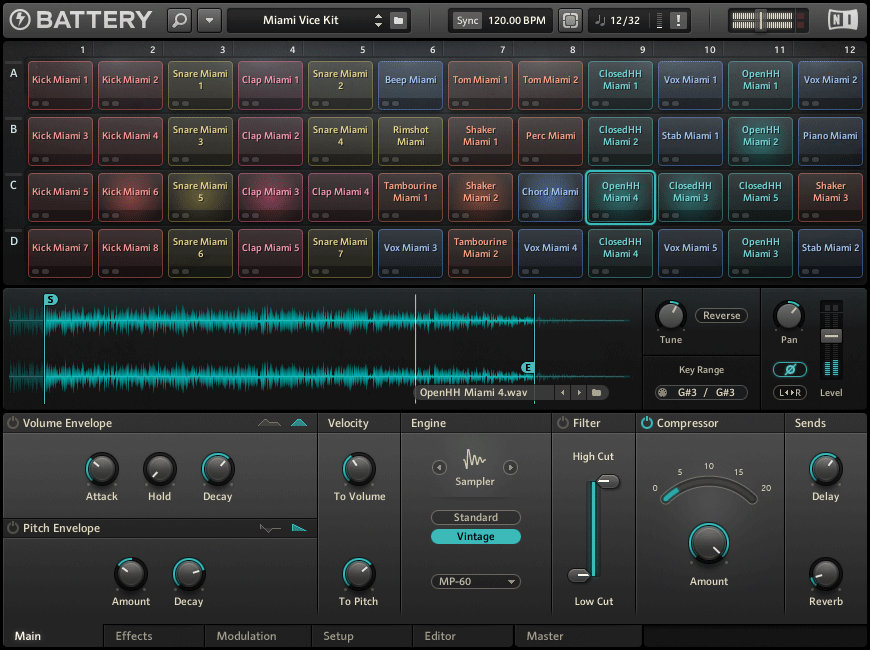
Battery 4 is a dedicated drum sampler from Native Instruments built around a 16x16 grid of cells, where each cell holds an individual sample and its own chain of processing tools. Unlike the drum machines built into most DAWs, Battery 4 gives you independent compression, saturation, filtering, and envelope control on every single hit, without any external routing or bussing required. This makes it the first choice for producers who want a complete drum production environment rather than a simple pattern trigger.
The plugin ships with an extensive factory library covering acoustic kits, classic drum machines, cinematic percussion, and genre-specific collections for techno, house, hip-hop, and trap. Every sample is professionally recorded and processed, so you can build a working kit immediately without sourcing external sounds. Battery 4 also accepts any audio file you drag into a cell, making your own sample collection a first-class part of the workflow from the first session.
The Cell Grid and How It Works
Each cell in Battery 4's grid is an independent instrument slot. You load a sample by dragging an audio file from your DAW browser, your desktop, or Battery's own file browser directly onto any cell. Once loaded, the cell shows a waveform thumbnail and responds to the MIDI note you assign, making it easy to map a full kit across a keyboard or pad controller without any additional configuration.
Clicking a cell opens the edit panel at the bottom of the interface, which contains tabs for the sample player, modulation, effects, and output routing. The sample player tab controls start and end points, loop settings, tuning, and velocity response. This per-cell depth lets you layer a sharp transient over a long sub tail, tune an 808 kick to match your track key, or set a hi-hat to choke when the open hat triggers — all within one plugin instance.
Cells are organized into groups, and each group shares a common output bus. This lets you send all snare sounds to one bus for parallel compression, route percussion hits to a sidechain trigger, or isolate a group for solo and mute during arrangement. The group structure mirrors how a professional engineer sets up a drum session in a hardware studio.
Per-Cell Processing: Compression, Saturation, and Beyond
Every cell in Battery 4 has its own effects chain that includes a compressor, a transient shaper, a bit crusher, a distortion unit, and a filter. This processing happens before the signal reaches the group bus, so you shape each sound individually before any shared treatment. The compressor is especially useful on kick and snare cells, where a fast attack controls the peak and a short release pumps the tail for presence in a dense mix.
The saturation and distortion modules are where Battery 4 separates itself from DAW drum machines. Running a snare through the tube saturation adds harmonic content that helps the drum cut through without raising its level. The bit crusher brings lo-fi texture to hi-hats and percussion in a single knob turn, and stacking it with the filter recreates the degraded, crunchy character of classic drum machine recordings.
Modulation inside Battery 4 connects LFOs and envelopes to any parameter in the effects chain. You can assign a slow LFO to filter cutoff on a loop cell for automatic movement, or use the volume envelope to shape the attack of a cymbal without editing the sample file itself. All modulation connections live inside the plugin, so they do not require DAW automation lanes or extra CPU for drawing curves.
Building a Custom Kit: Practical Workflow Tips
Starting from an empty kit is one of the most productive approaches in Battery 4. Load a kick into cell A1, a snare into B1, and a closed hat into C1, then build outward. Battery's file browser supports preview playback with the space bar, so auditioning dozens of kicks takes seconds rather than minutes. Once you find a sound you want, drag it directly onto the target cell to replace whatever was loaded before.
For electronic music, the loop cell type is worth exploring early. A loop cell plays a rhythmic audio file in sync with your DAW tempo, and combining several loop cells at different pitch offsets creates layered, evolving percussion textures from a single Battery instance.
- Load an 808 sub kick into a cell and open its edit panel.
- In the sample player tab, adjust the
tunecontrol in semitones to match your track's root note. - Use the envelope
decayslider to set how long the sub sustains — shorter for punchy trap, longer for lo-fi. - Route the cell to a dedicated group bus and add a separate compressor on that bus to achieve sidechain pumping without affecting the rest of the kit.
.nki file to preserve all processing, modulation, and routing — recall the entire state instantly in any future session.Frequently asked questions
How is Battery 4 different from a DAW drum machine like Ableton Drum Rack or FL Studio FPC?
<strong>Battery 4</strong> goes deeper on per-cell audio processing than any built-in DAW drum tool, including <strong>Ableton Drum Rack</strong> and <strong>FL Studio FPC</strong>. Each cell has its own compressor, saturation, filter, and modulation routing, which a DAW drum machine does not provide without adding external plugins on each return. Battery also handles large sample libraries more efficiently through its dedicated browser and group bus system, making it better suited for sessions where per-hit sound design and mix control matter as much as pattern playback.
Does Battery 4 run as a standalone application or does it need a DAW?
Battery 4 requires a DAW or plugin host — it does not include a standalone mode. It runs as a plugin inside any DAW that supports VST, VST3, AU, or AAX formats, covering <strong>Ableton Live</strong>, <strong>FL Studio</strong>, <strong>Logic Pro</strong>, <strong>Pro Tools</strong>, <strong>Cubase</strong>, and others. Most producers use it directly inside their main session because the DAW provides MIDI sequencing, automation, and mixer routing that Battery relies on for a complete workflow.
Can I use my own samples in Battery 4, or am I limited to the factory library?
Battery 4 accepts any audio file in <code>WAV</code>, <code>AIFF</code>, or <code>MP3</code> format — drag a file from your desktop or DAW browser onto any empty cell and it loads immediately. You can mix your own samples and factory sounds in the same kit, apply the same per-cell processing to both, and save the result as a reusable <code>.nki</code> kit file. There is no restriction on how many custom samples a single kit can contain.
Recommended Related Products
Native Instruments Battery 4
Advanced drum sampler designed for electronic and hip-hop beats.