
How to Design a Fat Bass Patch in Serum from Scratch
A step-by-step guide to building a thick, mix-ready bass in Serum using oscillators, unison, filters, a sub layer, and the FX chain.
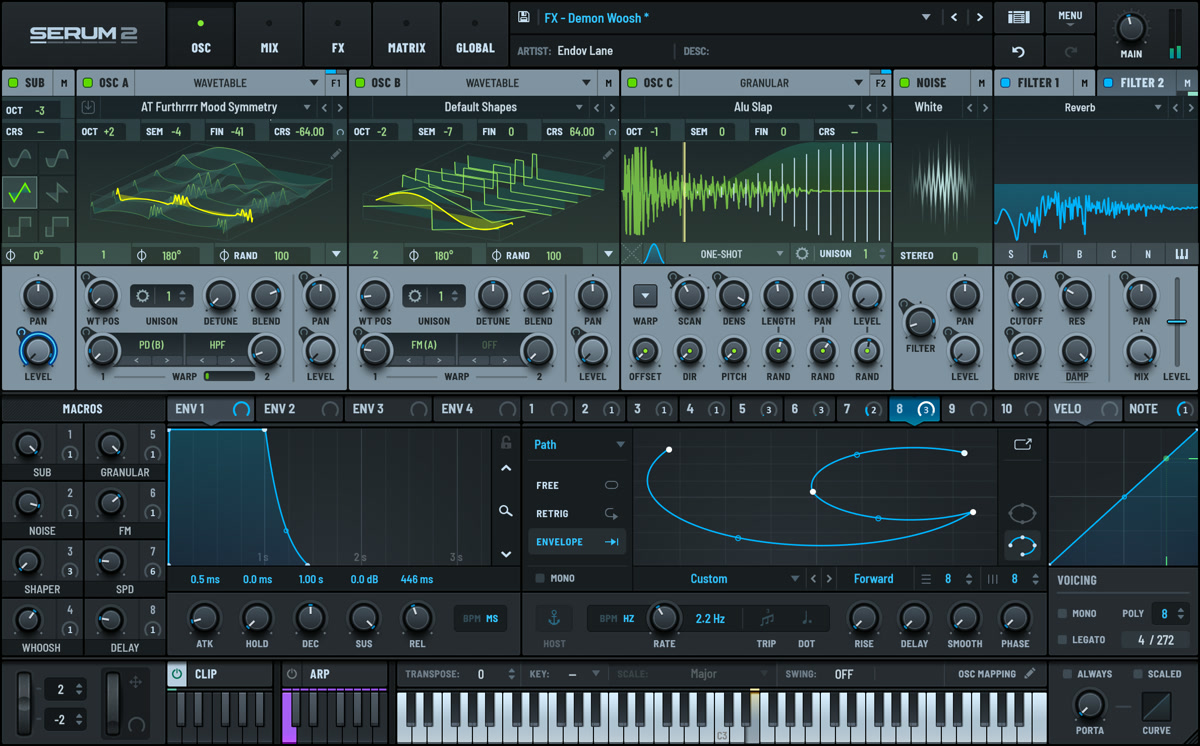
No single knob makes a bass fat. The weight comes from stacking the right oscillator content, locking the low end to a clean sub, adding movement with filters and envelopes, then widening and saturating the upper harmonics without breaking mono compatibility. Serum, by Xfer Records, is the best place to learn this because every stage of the signal path is visible on screen — you watch each decision reshape the waveform as you make it.
We will build a full bass patch from a blank preset. The same logic carries over to Reese bass, future bass growls, house and techno basslines, and trap 808-style sub-bass. Once the order of operations clicks, you can bend it to fit any genre.
Step 1: Pick the Right Oscillator and Wavetable
Start with a blank preset so OSC A is your only sound source. For bass, reach for a wavetable with strong low-mid energy — a plain saw or analog-style saw table gives you plenty of harmonics to filter and saturate later.
- Initialise a blank preset and confirm
OSC Ais the sole active oscillator. - Select a saw or analog-style saw wavetable. For a darker, more aggressive tone, scan the wavetable position to a frame with more upper-harmonic content — the filter will tame it.
- Set the octave so the root note sits in the bass range: roughly the second octave below middle C.
Step 2: Anchor the Low End with a Sub Layer
The sub is what makes a bass feel powerful on club rigs and phone speakers alike. Enable Serum's dedicated sub oscillator, set it to a pure sine one octave below OSC A, and blend it in around 40 to 60 percent so it reinforces the fundamental without burying the character of the main oscillator.
- Sub oscillator: pure sine, one octave below
OSC A - Mix: 40 to 60 percent, set by ear against the main oscillator
- No unison, no detune — 100% mono
- High-pass everything else below the sub so two layers never fight over the same 40 to 60 Hz region
Step 3: Use Unison for Width, but Stay Mono in the Lows
Unison turns a thin oscillator into a wide, expensive-sounding bass. The catch: unison and detune in the low frequencies cause the same phase problems as a stereo sub. The pro fix is to confine the spread to harmonics above roughly 150 Hz.
- On
OSC A, raise the unison voice count to 4–8 and add detune around 0.10 to 0.20. - Use Serum's warp and unison spread controls — or a multiband effect — to narrow the stereo width in the lower octaves, keeping spread in the harmonics above 150 Hz.
- Confirm the sub stays dead centre while the harmonics breathe around it.
Step 4: Shape Tone and Movement with the Filter
Route OSC A and the unison layer through a low-pass filter. Low 24 (ladder-style) gives a warm, analog roll-off; Low 12 keeps more bite. Movement is what separates a flat bass from a living one — use envelope and LFO modulation to animate the cutoff.
- Route the main oscillator and unison layer through a low-pass filter. Pull the cutoff down until the sound is focused.
- Add resonance for a vocal, pronounced peak if the genre needs it.
- Assign
ENV 2to filter cutoff with a fast attack and short-to-medium decay — the filter snaps open on each note and closes for a punchy, plucked character. - For a Reese bass, route an LFO to wavetable position or detune instead, for slow grinding modulation.
- Enable Drive or Fat inside the filter for analog-style saturation that thickens the tone.
Step 5: Finish with the FX Chain
Serum's built-in effects let you finish the patch without leaving the synth. The priority is generating upper harmonics so the bass cuts through on small speakers while keeping the sub clean.
- Add multiband distortion or the built-in EQ. Apply saturation to the mid and high bands only — leave the sub band clean and undistorted.
- Set a high-pass on the EQ around 30 Hz to clear inaudible rumble, then shape the mids gently.
- Add a small amount of
Hyper/Dimensionfor chorus-like width on the harmonics. Use a short reverb or tiny delay sparingly — too much smears the transient. - Check the patch in mono alongside your drums. If the bass thins out, tighten the sub level or reduce low-frequency detune.
Frequently asked questions
Why does my Serum bass disappear when I check it in mono?
Stereo content or detuning in the low frequencies is the cause. When a wide, detuned signal is summed to mono, out-of-phase content cancels out. Keep the sub oscillator in pure mono with no detune, and restrict unison width to harmonics above roughly 150 Hz. That keeps the foundation centred and solid on phone speakers and club systems alike.
How do I make a Reese bass in Serum?
A <strong>Reese bass</strong> is two detuned saw layers beating against each other. Use <code>OSC A</code> and <code>OSC B</code>, or heavy unison on one oscillator, with moderate detune, then route a slow LFO to the detune or wavetable position for grinding, evolving movement. Filter the top with a low-pass, add a sub for weight, and use multiband distortion so the mid harmonics survive on small speakers.
Should I add the sub before or after designing the main sound?
Design the main oscillator first so you know what tonal space it fills, then add the sub to reinforce the fundamental. Blending the sub in last lets you set its level by ear against the main layer, and you can high-pass the upper layers so they never compete with the sub for the same low region.
Do I need Serum 2 to make a fat bass, or is the original Serum enough?
The original <strong>Serum</strong> is more than capable of professional bass and appears on countless commercial records. <strong>Serum 2</strong> adds extra oscillator types, refined unison tuning modes, and more built-in effects that speed up the workflow. The core method — oscillator plus mono sub plus filter movement plus harmonic saturation — is identical in both versions.
Recommended Related Products
Xfer Records Serum
Visual wavetable synthesizer with high-quality sound and flexible routing.