
VocAlign Pro 6 vs Melodyne: Which Tool Tightens Vocals Better?
VocAlign Pro 6 and Melodyne both tighten vocals, but they solve different halves of the problem. VocAlign aligns timing between takes; Melodyne edits pitch and timing note by note. Here is how to choose, and why pros often use both.
Stacked vocals are everywhere in modern music: lead doubles, octave layers, background harmonies and ad-libs. The hard part is making all those layers feel like one tight performance instead of a loose smear. Two tools dominate this work, Synchro Arts VocAlign Pro 6 and Celemony Melodyne, and producers constantly ask which one they should buy.
They are built for different jobs. VocAlign is a timing-alignment specialist that matches one vocal to another automatically. Melodyne is a note-level pitch and timing editor that reshapes a single performance by hand. Once you get that distinction, you know exactly when to reach for each.
What VocAlign Pro 6 does
VocAlign exists to align the timing of one vocal to another. You give it a guide track, usually the lead vocal, and a dub track such as a double or a harmony, and VocAlign automatically time-stretches the dub so its syllables line up with the guide. It is the fastest way to tighten doubles, triples and background vocals, because the software does the matching in seconds.
VocAlign Pro 6, released in 2024, added workflow improvements: a dark theme, collapsible control panels, better zoom and scrolling, Arm Capture All for grabbing several tracks at once, and full undo/redo. Pro Tools users also got ARA integration. Its SmartPitch feature can match the pitch of dubs to the guide via modes including Match All To Guide, Match Unison Only, and Match Unison & Tune Non-Unison.
- Best at: aligning the timing of doubles, triples and background vocals to a guide.
- Automatic: matches a dub to a guide in seconds rather than note by note.
- SmartPitch: matches dub pitch to the guide with several selectable modes.
- Built for stacks: the more layers you have, the more time it saves.
What Melodyne does
Melodyne edits a single performance in detail. It analyzes audio into note objects called blobs and lets you change the pitch, timing, length, vibrato and formants of each note individually. It is the gold standard for correcting intonation, fixing a flat syllable, smoothing vibrato and tightening a single take against the grid.
Where Melodyne pulls far ahead of VocAlign is pitch. Its Direct Note Access technology can even separate and retune individual notes inside a recorded chord. Melodyne only aligns timing by manually moving or stretching blobs within one track — it will not automatically conform one vocal to the rhythm of another the way VocAlign does, so aligning a big stack of doubles by hand in Melodyne is slow.
The key difference: alignment vs editing
VocAlign answers "how do I make these layers line up with the lead?" Melodyne answers "how do I make this one take perfectly in tune and in time?" One is a relationship between tracks; the other is the internal correction of a single track.
For pure vocal tightening of doubles and backgrounds, VocAlign is usually faster and better — automatic alignment is exactly what it was designed to do. For pitch correction and surgical repair of a lead vocal, Melodyne is the stronger tool. Forcing either to do the other's job is where frustration comes from.
Why professionals use both together
In real sessions these tools are not competitors, they are stages in a workflow. The standard pro approach: tighten timing with VocAlign first, then tune with Melodyne.
- Sessions full of stacked doubles, harmonies and ad-libs: buy VocAlign — it saves the most time.
- Priority is detailed pitch correction and repair on lead vocals: buy Melodyne — note-level editing is its core strength.
- Align all doubles and harmonies to the lead with VocAlign so every layer sits rhythmically together.
- Run the lead and any exposed parts through Melodyne to correct pitch and polish intonation.
Frequently asked questions
Is VocAlign better than Melodyne for tightening vocals?
For aligning the timing of doubles and background vocals to a lead, yes — VocAlign is usually faster and better because automatic alignment is what it was built for. Melodyne can tighten timing too, but only by manually moving blobs within a single track, which is much slower on large vocal stacks.
Can VocAlign correct pitch like Melodyne?
VocAlign Pro 6 includes <code>SmartPitch</code>, which can match the pitch of a dub to a guide track with modes like <code>Match All To Guide</code> and <code>Match Unison Only</code>. For detailed note-by-note pitch correction and repair of a single performance, Melodyne is significantly more capable thanks to its blob editing and <code>Direct Note Access</code>.
Should I use VocAlign before or after Melodyne?
Use VocAlign first to align timing, then Melodyne to tune. Locking the timing of all your layers before pitch editing means your Melodyne corrections are not disturbed by later alignment changes.
If I can only buy one, which should I choose?
Choose based on your most frequent task. If your sessions are full of stacked doubles, harmonies and ad-libs that need tightening, VocAlign saves the most time. If your priority is correcting and repairing the pitch of lead vocals in detail, Melodyne is the stronger choice.
Recommended Related Products
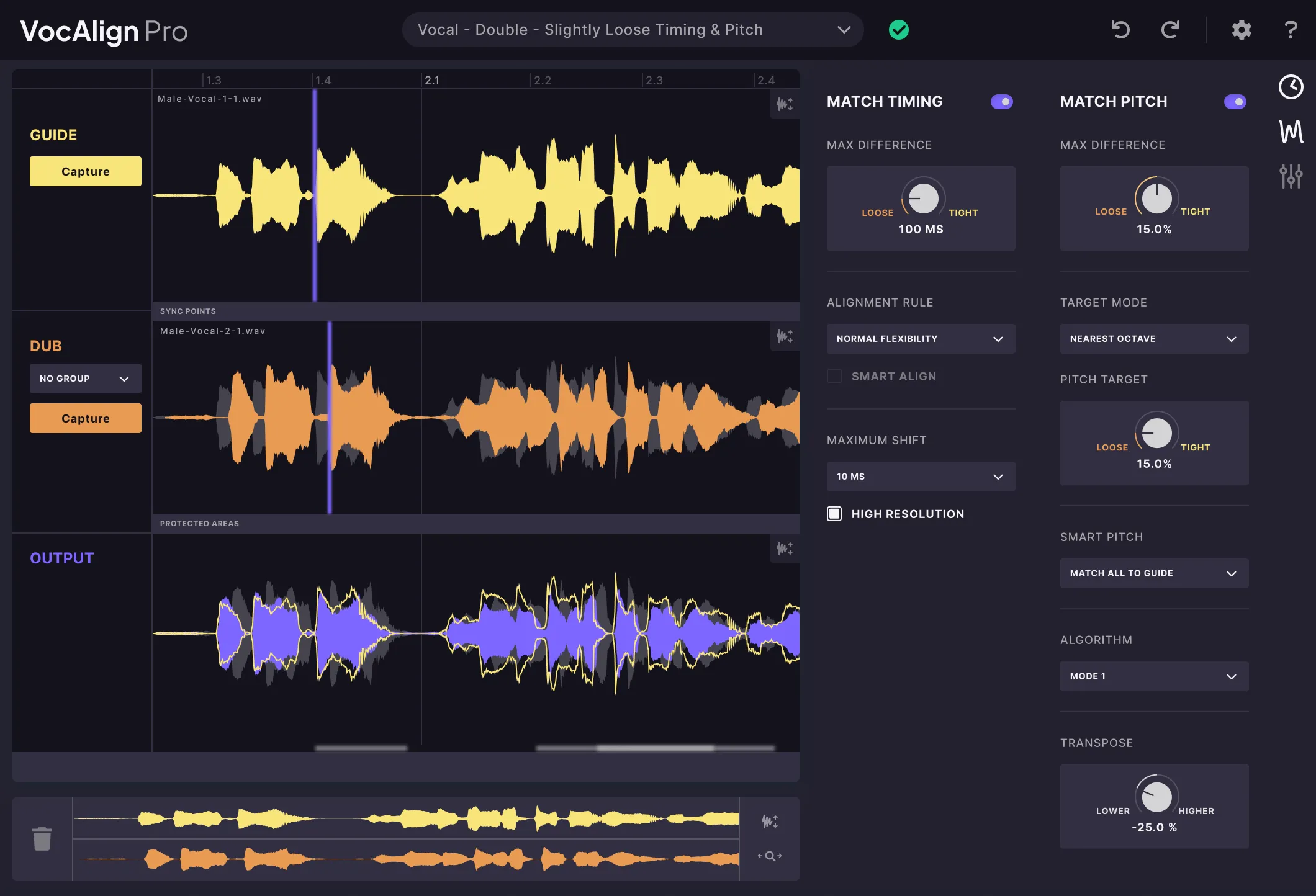
Synchro Arts VocAlign Pro 6
Automatically time-align and pitch-match multiple vocal takes in seconds.