
Layering Electronic Drums in Battery 4: Kick, Snare and Clap Stacking
Learn how to layer and stack electronic kicks, snares and claps inside Native Instruments Battery 4 to build punchy, original drum sounds with the right sample selection and phase control.
A great electronic drum sound is almost never a single sample. The kicks, snares and claps you hear on professional house, techno, trap and pop records are usually two, three or more sounds stacked carefully, so each layer covers a different part of the frequency spectrum and the transient. Native Instruments Battery 4 is built for exactly this kind of work: a cell-based drum sampler where every pad can hold multiple layers, each one tuned, panned and shaped on its own.
This guide covers the thinking behind drum layering and shows how to pull it off inside Battery 4. You will learn how to pick samples that complement each other, how to split a sound by frequency role, how to keep your layers in phase so they hit harder instead of cancelling out, and how to use color-coded cells to keep a growing kit organized.
Why Layer Drums at All
Layering exists because no single sample usually does everything you need. One kick might have a perfect punchy attack but a weak low end. Another might have a deep, sustained sub but a dull click. Stack them and you get both. The same logic runs across the kit: a snare gets its crack from one layer and its body from another, and a clap gets width and realism from blending several individual claps with slightly different timing and tone.
Each layer should have a clear job. If two samples fight for the same frequency range at the same moment, they clash and the result turns muddy or weak. Give each one a role: sub, body, attack, top and texture. When every layer owns its space, the combined sound is bigger and tighter than any single sample could be.
- Sub layer: the low fundamental weight (mainly for kicks and 808s).
- Body layer: the punch and midrange that gives the hit its character.
- Attack / click layer: the high-frequency transient that cuts through a mix.
- Top / texture layer: noise, air, or vinyl crackle for character and width.
Stacking Layers Inside a Battery 4 Cell
In Battery 4, each cell on the grid can hold multiple samples mapped across velocity and round-robin slots. To layer, drag extra samples into the same cell so they all trigger from one MIDI note. The Cell and Edit pages let you tune each layer independently: pitch, volume, pan, envelope and the modular effects chain are all per-cell.
- Start with your foundation sample at unity gain.
- Bring each extra layer up slowly until it fills the gap without swamping the core.
- Tune the sub layer to the key of your track so the low end stays in tune with the bass.
- Use the amp envelope to shorten the attack layer so it only adds the initial click.
- Let the body layer ring a little longer to support the transient.
Checking Phase So Layers Hit Harder
To fix phase issues, line up the transients of your layers so they start at the same moment, and flip the polarity of a layer if combining them makes the sound thinner rather than fuller. A quick test: solo the two low layers together and toggle the polarity of one. Keep whichever setting sounds louder and punchier. This one habit is the difference between a kick that thumps and one that disappears in the mix.
- Align the start points of low-frequency layers so transients coincide.
- Flip
polarityon one layer if the stack sounds thinner than a single sample. - Solo the sub layers and keep the polarity setting that sounds louder and fuller.
- Keep high-frequency attack layers short so they do not muddy the low end.
Layering Claps for Width and Realism
A real hand clap is many hands hitting at slightly different times. To recreate that, layer two or three different clap samples and offset their timing by a few milliseconds, or use samples that already have different attack profiles. Pan the layers a little left and right for width, and add a short reverb or a noise tail to glue them into one believable clap instead of a flutter of separate hits.
For modern electronic and trap claps, stack a tight, bright clap for the transient with a wider, more processed clap underneath for body, and add a snare layer if you want extra crack. Battery 4 makes this easy because each clap layer lives in the same cell with its own pan, tuning and envelope, so you sculpt the whole composite clap from one pad.
Staying Organized With Color-Coded Cells
As a kit grows, organization keeps you fast. Battery 4 lets you color-code cells, so set a consistent palette: one color for kicks, one for snares, one for claps, one for hats, and so on. A complex layered kit becomes instantly readable, and programming and performing both speed up. Save your finished stacks as kits, so a layered kick you built once becomes a reusable building block in future projects.
A pack like the Battery 4 library and its expansions gives you a deep, color-coded starting point of pre-built kits and individual samples that already sit well together, which shortens the time between idea and finished beat. Combine those sounds with your own layering discipline and you can build punchy, original drums that stand out, instead of leaning on the stock one-shots everyone else is using.
Frequently asked questions
How many layers should an electronic kick or snare have?
Two to three layers is the practical range: a sub for weight, a body for punch, and a short attack click for definition. Snares often use a body layer plus a noise or top layer for crack. Adding more layers only helps if each one has a distinct job — if two layers cover the same frequency and timing, remove one rather than stacking endlessly.
Why does my layered kick sound weaker than a single sample?
Phase cancellation is almost always the cause. When the low end of two layers is out of phase, the waveforms partly cancel and you lose punch. Align the transients so the layers start together, then try flipping the <code>polarity</code> of one layer. Solo the sub layers and keep whichever polarity setting sounds louder and fuller.
How do I make a clap sound wide and realistic in Battery 4?
Layer two or three different clap samples in the same cell, offset their timing slightly, and pan them a little left and right for width. A short reverb or noise tail glues the separate hits into one believable clap. For trap and house claps, combine a bright transient clap with a wider processed clap, and add a snare layer for extra crack.
Can I save my layered drum stacks for reuse in Battery 4?
Yes. Save any finished cell or full kit as a <strong>Battery 4</strong> kit. Color-coding cells by drum type keeps large kits readable, and your custom stacks become reusable building blocks — a kick you perfected once drops into any future project instantly.
Recommended Related Products
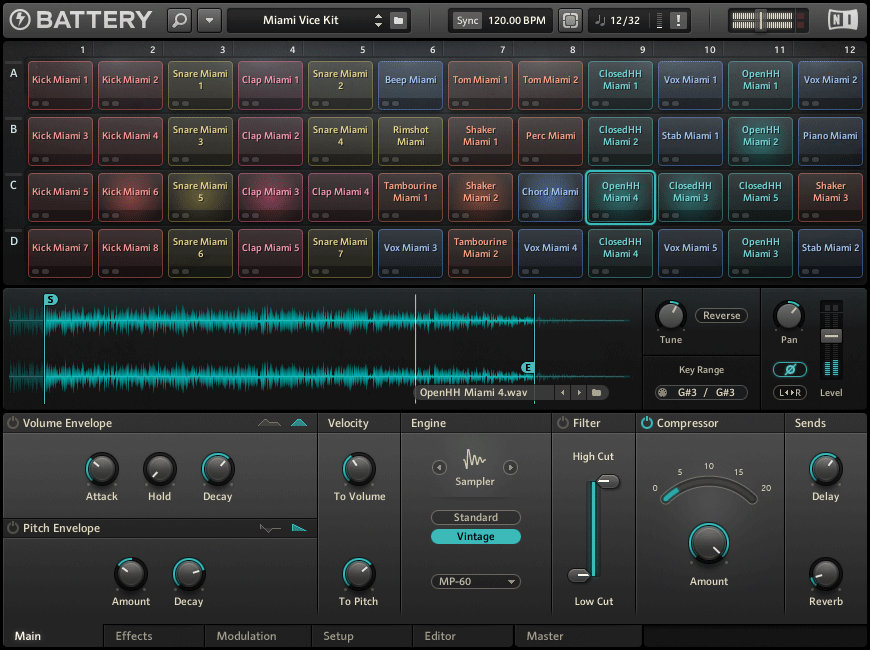
Native Instruments Battery 4
Advanced drum sampler designed for electronic and hip-hop beats.