
Producing EDM and Pop Fast with reFX Nexus 5
How reFX Nexus 5 evolved from a rompler into a full synth, and how its preset-first workflow lets you build EDM and pop tracks at speed.
reFX Nexus 5 is the go-to plugin for producers who want professional, finished sounds without deep sound-design work. It is no longer just a rompler that plays back samples, but a full synthesizer with a modular engine, multiple synthesis types, a built-in sample editor, and a stack of new effects, all while keeping the famous one-click preset workflow that made the brand popular.
This guide covers what changed in Nexus 5 and how to use it to write EDM and pop tracks quickly without getting lost in menus.
From Rompler to Full Synth
Earlier versions of Nexus were essentially romplers: high quality, but limited to playing and layering pre-made sounds. Nexus 5 keeps that immediacy and adds a genuinely deep engine underneath. You now get several synthesis options, including virtual analog, sampler, time stretcher, wavetable, retro, granular, cloud, and FM, plus a fully accessible modular engine for routing.
It also adds a built-in sample editor with a slicer, looping, and crossfade options, so you can import single samples, multi-samples, or entire libraries and have them sliced and looped automatically. In practice, Nexus 5 can be both your instant-preset workhorse and a tool for building custom sounds whenever you want.
- Synthesis types: virtual analog, sampler, time stretcher, wavetable, retro, granular, cloud, and FM
- Built-in sample editor with slicer, loop, and crossfade
- New effects including bucket-brigade delay emulation, particle reverb, vowel filter, rotary, and more
- Backward compatible: loads older Nexus sounds and projects, with a retro skin option
The Preset-First Workflow
Nexus is fast because of its production-first philosophy: grab a preset, tweak a few macros, and print, no menu-diving required. Nexus 5 ships with thousands of presets and many gigabytes of content covering EDM, melodic techno, house, hip hop, drum and bass, and pop, so the right starting point is usually just a search away.
The right-hand panel shows the individual layers of a sound, all clearly labelled, so you can see and adjust the parts that make it up. For songwriting this is ideal: audition dozens of professional sounds against your chord progression in minutes and commit to the one that fits, instead of spending an hour programming a synth from scratch.
Building an EDM or Pop Track Quickly
A fast Nexus 5 workflow follows a clear sequence. Because every preset is already mix-ready, you spend your time arranging and writing instead of fixing tone.
- Lay down your chord progression using a lush pad or piano preset.
- Layer a bright pluck or supersaw lead on top for the hook.
- Use the macro knobs to adjust filter, attack, and width so each layer sits in its own space — no menu-diving into the engine required.
- Choose a bass preset for the low end and keep it mono and tight.
- Add polish with the new effects: particle reverb for atmosphere on pads, vowel filter or rotary for movement on leads, and bucket-brigade delay for vintage-flavoured echoes.
When Nexus 5 Is the Right Tool
Nexus 5 is at its best when speed and finished sound matter more than building everything from scratch. For commercial EDM, pop, and dance-pop with tight deadlines and a polished record as the goal, it is one of the fastest plugins around. And thanks to the new synth engine, when you do want to customise, you are no longer locked to factory content.
If your priority is learning synthesis deeply or designing wholly original signature sounds, a from-scratch synth like Serum gives you finer control. Many producers use both: Nexus 5 to sketch and finish ideas quickly, and a dedicated wavetable synth when a track needs a unique custom sound no preset can provide.
Frequently asked questions
Is Nexus 5 still just a rompler?
No. Nexus 5 is now a full synthesizer with a modular engine and several synthesis types, including virtual analog, wavetable, granular, cloud, and FM, plus a built-in sample editor. It keeps the fast preset-based workflow of earlier versions, but it is now genuinely capable of synthesis and custom sound creation, not just playing back pre-made samples.
Can I import my own samples into Nexus 5?
Yes. Nexus 5 includes a built-in sample editor with a slicer, looping, and crossfade options. You can import single samples, multi-samples, or entire libraries, and the plugin can slice and loop them automatically, which was not possible in older versions limited to factory content.
Will my old Nexus projects still work in Nexus 5?
Yes. Nexus 5 is backward compatible. It loads and supports older Nexus sounds, and projects that used previous versions open without issues in your DAW. There is even a retro skin option that brings back the classic look of earlier versions if you prefer it.
Is Nexus 5 good for beginners?
Yes. Its preset-first, production-first design means a beginner can load a professional-sounding preset, adjust a few clearly labelled macros, and have a usable EDM or pop part in minutes without understanding synthesis. As you grow, the new modular engine and sample editor give you room to go deeper when you are ready.
Recommended Related Products
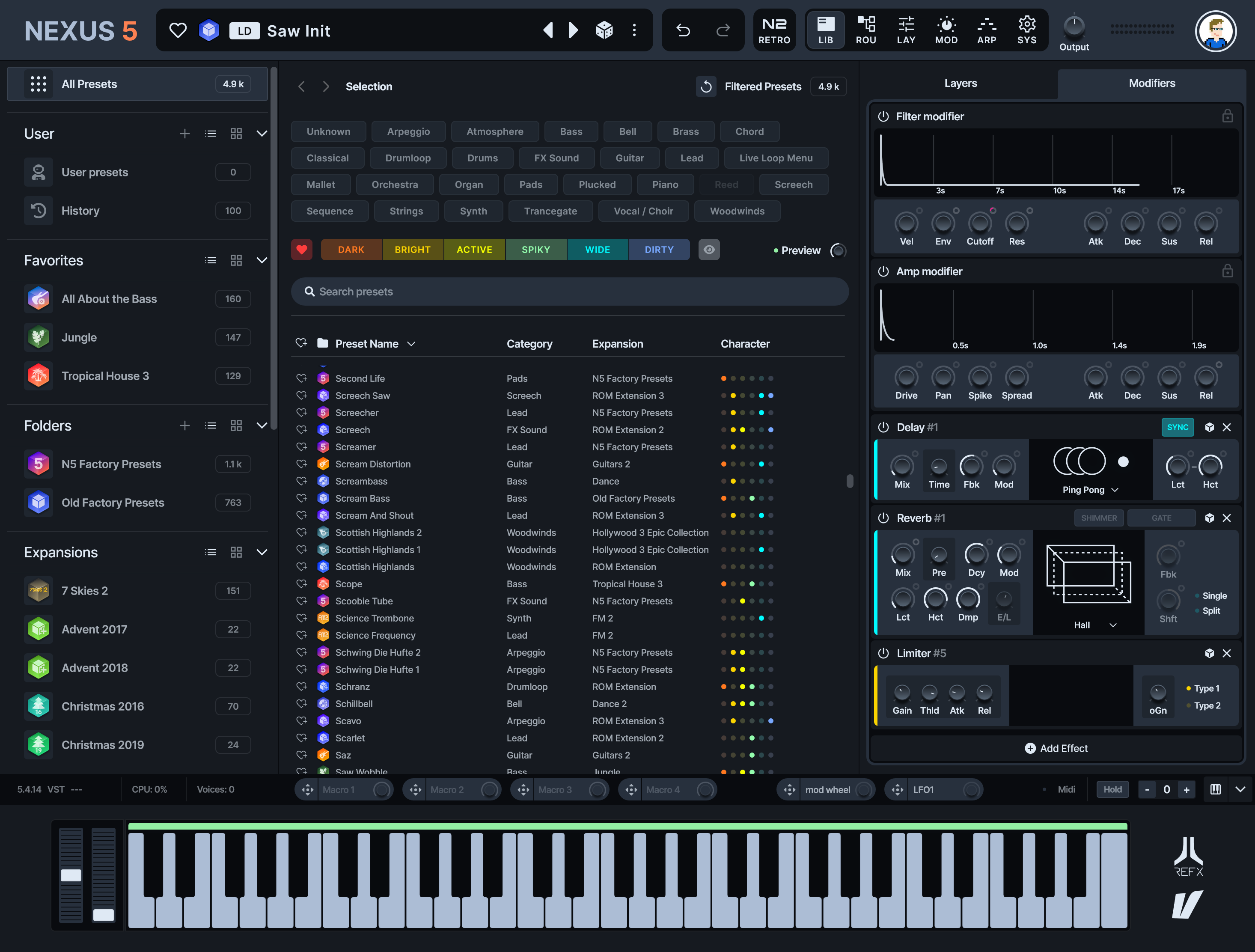
reFX Nexus 5
Next-level production rompler with massive library of chart-ready sounds.