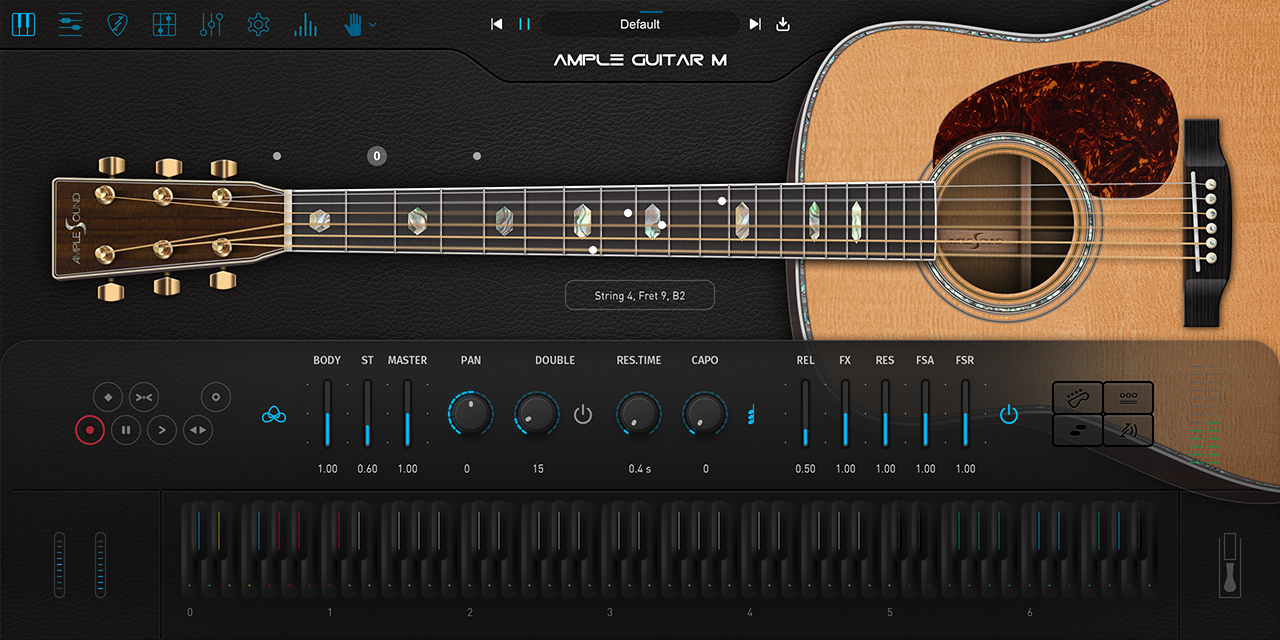
Programming Realistic Acoustic Guitar with Ample Guitar: Strumming, Capo, Legato and Humanizing
A sampled acoustic guitar only sounds real when you play it like a guitar, not a piano. Here is how to use Ample Guitar's strum engine, Capo Logic, legato keyswitches and humanize controls to write a part that passes for a live take.
The number one reason a virtual acoustic guitar sounds fake is that it gets programmed like a keyboard part. Block chords with all six notes held down, identical velocities, perfect grid timing, no change in articulation. A real guitarist does none of those things. Ample Guitar M, built from a Martin steel-string acoustic, gives you everything you need to fix each problem. But the realism lives in how you drive it, not in the samples on their own.
This guide covers the four things that matter most for a convincing acoustic part: the strum engine, Capo Logic and voicing, legato and the articulation keyswitches, and the humanize controls that break up the machine-like regularity. Treat MIDI here as performance editing, not note entry, and the gap between a sampled guitar and a recorded one shrinks fast.
Strum Mode: Stop Playing Block Chords
Ample Guitar splits playing into a solo/lead approach and a dedicated strum mode, and most producers grab the wrong one. Hold a C major triad in the lower octave and you trigger individual sustained strings stacked vertically, which is exactly the keyboard-style voicing that gives the game away. Strum mode maps full chord voicings and strum gestures instead, and the engine gives you a large set of strum patterns and articulations rather than a static chord.
The strum system reads the chord you hold and lets you trigger up-strums, down-strums, mutes and single string picks from a dedicated key range. Because the engine spreads each strum across the strings with realistic string-by-string delay, a single strum already carries the micro-timing of a real hand sweeping the strings. No amount of nudging six MIDI notes by hand will reproduce that convincingly.
- Use the strum key range to trigger up and down strokes instead of holding all chord tones at once.
- Alternate down and up strokes with the groove; real players rarely down-strum every beat.
- Drop muted (chuck) strokes between chords for rhythmic motion and a percussive feel.
- Let Strum Legato carry hammer-ons and pull-offs across a strummed passage for embellishments.
Capo Logic and Realistic Voicings
A guitar is not a piano laid on its side. The same chord can be fingered in several positions, each with a different string set, open strings and timbre, and a real player picks the voicing that feels comfortable and sounds right in context. Capo Logic models this. It chooses which fret and string each note plays on according to guitar rules, so the instrument behaves like a fretted instrument rather than a free-floating sampler.
Capo Logic matters most when you want a part to sit in a certain register or to mimic a capoed performance. Move the virtual capo and you shift the available open strings and the voicings that follow, which changes the brightness and ring of the chords without re-voicing every note by hand. Combine it with the strum engine and the instrument picks string and fret combinations a human hand could actually reach, so the impossible voicings that betray MIDI programming simply do not happen.
In practice, let the engine handle the voicing decisions rather than fighting it. Enter the chord, choose the position or capo that gives the tone you want, and trust the scripting to assign strings the way a guitarist would.
Legato, Slides and Articulation Keyswitches
On guitar, expression comes from the transitions between notes far more than the notes themselves. Ample Guitar gives you keyswitches for the articulations that define guitar phrasing: hammer-on and pull-off (poly legato), slides between notes, slide in and slide out, palm mute, natural and pinch harmonics, and pop/slap body noises. Mapping these into a melody is what turns a row of pitches into a phrase.
For lead lines and fingerpicked passages, use legato to connect notes a player would slur with the fretting hand instead of re-picking. A short slide into a target note, a pull-off at the end of a phrase, a palm-muted run under a vocal: each one reads instantly as a guitar gesture. The poly legato system even works alongside Capo Logic, so a legato slide moves to the correct capoed fret and string just like the real instrument.
- Record the basic pitches first without any articulation keyswitches.
- Listen back and mark the moments where a guitarist would naturally add a slide, hammer-on, or palm mute.
- Paint in keyswitches at those moments only — sparse, well-placed articulations sound far more authentic than constant ornamentation.
Humanize: Breaking the Grid
Even with perfect voicings and articulations, perfectly quantized timing and identical velocities still sound programmed. Humanize adds subtle random variation to velocity and flexes the timing so repeated notes and strums stop landing mechanically.
Beyond the built-in humanize, do the work you would do for any acoustic instrument. Vary your velocities on purpose so the accents fall where a guitarist would push. Pull some strums a touch ahead or behind the grid. Let chord changes breathe with tiny timing imperfections. Add round-robin sample variation so repeated strums do not reuse the same recording, and the part stops sounding like a loop.
Finally, mind the noises a real guitar makes: fret noise, finger slides on wound strings, body resonance. Ample Guitar can add these refining sounds automatically, and leaving them in at a tasteful level is what convinces the ear it is hearing a person in a room, not a sampler in a DAW.
- Turn on Humanize to randomize velocity and timing automatically.
- Hand-edit velocities to place natural accents instead of flat dynamics.
- Keep fret and finger noises audible at a subtle level for realism.
- Skip 100 percent quantization; leave small timing imperfections in strums and chord changes.
Putting It Together
A convincing Ample Guitar part is the sum of small, correct choices: strum gestures instead of block chords, Capo Logic voicings a hand could play, legato and slides at the phrase transitions, humanized timing and velocity throughout. None of these are hard on their own, but skip any one and you leave a tell that listeners hear even if they cannot name it.
Once the performance is right, treat the output like a recorded guitar at mix time: a gentle high-pass to clear sub rumble, light compression to even out the dynamics, a touch of reverb or room to place it. Programmed well, Ample Guitar M holds its own next to live instruments in pop, singer-songwriter, lo-fi and cinematic productions where hiring a player is not an option.
Frequently asked questions
Why does my Ample Guitar part still sound fake even with good samples?
The samples are rarely the problem — the performance programming is. Holding all chord tones as sustained notes in one register, quantizing everything to a perfect grid, and using identical velocities produces voicings and timing no guitarist would create. Switch to the strum engine for chords, let Capo Logic choose realistic string and fret positions, add legato and slides at the phrase transitions, and turn on Humanize so velocity and timing vary.
What is Capo Logic and do I need to use it?
Capo Logic is the scripting that decides which string and fret each note plays on, following real guitar rules instead of treating the instrument like a free-floating sampler. It keeps voicings physically playable and lets you emulate a capoed performance by shifting the available open strings, which changes the tone and ring of the chords. You do not have to micromanage it — enter your chords, pick the position or capo that sounds right, and let the engine assign strings the way a guitarist would.
How do I make strummed chords sound natural in Ample Guitar?
Use the dedicated strum mode rather than holding block chords. Trigger up and down strokes from the strum key range, alternate the stroke direction with the groove, and drop muted chuck strokes between chords for rhythmic motion. The engine already spreads each strum across the strings with realistic string-by-string timing, so you get the micro-timing of a real strumming hand. Add Strum Legato for hammer-ons and pull-offs, and keep velocities varied so no two strums are identical.
Should I leave fret and finger noise in the final mix?
Yes, at a tasteful level. Fret squeaks, finger slides on wound strings and body resonance are part of what tells the listener they are hearing a real instrument played by a person. Ample Guitar can add these refining sounds automatically. Strip them out entirely and the part sounds sterile and synthetic. If they get distracting, turn their level down rather than removing them completely.